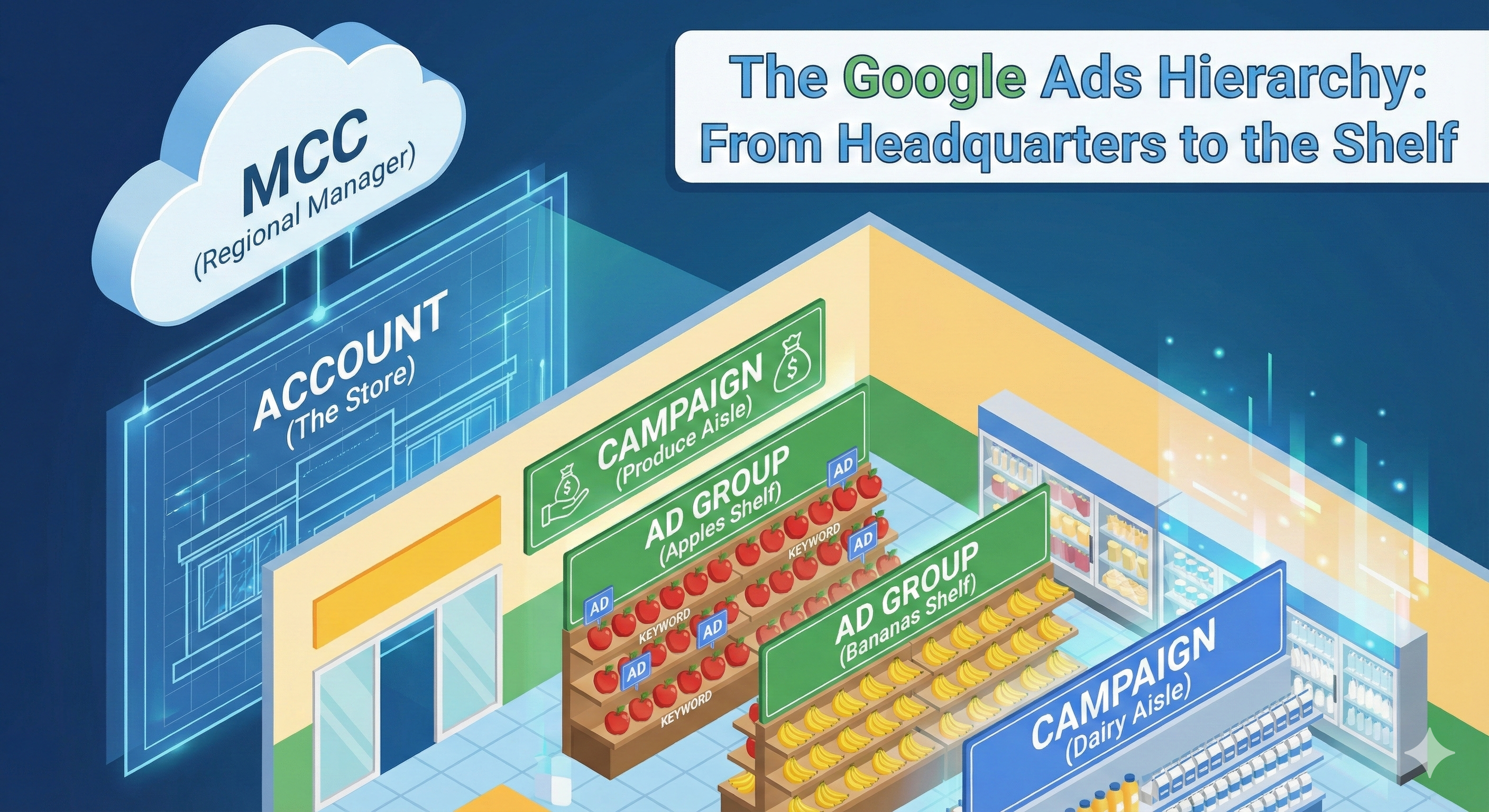
Let’s be honest: The first time you open Google Ads, it doesn’t look like a marketing tool. It looks like the control panel of a spaceship. There are buttons everywhere, graphs moving up and down, and a dozen different tabs screaming for your attention.
Many people give up right there. Others push buttons randomly and wonder why their money disappears.
But the secret to Google Ads isn't knowing what every button does—it's understanding the hierarchy.
To explain this, we aren't going to talk about "algorithms" or "CPC." Instead, I want you to meet Sam, a grocery store owner.
Here is how Sam’s grocery empire explains the perfect Google Ads structure.
Level 1: The MCC (The Regional Manager)
Imagine Sam is incredibly successful. He doesn't just have one grocery store; he owns "Sam's Supermarket" in New York, a "Sam's Pet Supply" in Jersey, and a "Sam's Hardware" in Connecticut.
If Sam had to drive to each physical store just to check the cash register, he’d never sleep. He needs a central office where he can see the sales for all his businesses at once.
In Google Ads, this is the MCC (My Client Center).
- The Story: The MCC is Sam's headquarters. He logs in once and sees every single business he owns listed on a dashboard.
- The Tech: An MCC Account (now called a Manager Account) is a master shell. It doesn't run ads itself; it holds other accounts. You only need this if you are an agency or a business with multiple distinct brands or websites.
Level 2: The Client Account (The Store Location)
Now, let's zoom in. Sam leaves headquarters and drives to his flagship location: "Sam's Supermarket."
This is the Client Account.
- The Story: Everything that happens inside the doors of this specific building belongs here. This is where the electricity bill is paid and where the store manager works.
- The Tech: The Account Level is where you set your Billing and User Access.
- SEO Tip: A golden rule of Google Ads hierarchy is One Website = One Account. Never try to advertise your Pet Supply business inside your Supermarket account. It’s like trying to sell dog food in the produce aisle—confusing and messy.
Level 3: Campaigns (The Aisles)
Sam walks into his supermarket. He doesn't just pile all the food in the middle of the floor. That would be chaos. He organizes the store into Aisles. He has a Produce Aisle, a Dairy Aisle, and a Frozen Aisle.
Here is the most important part: Sam gives each aisle a specific amount of space and electricity. He doesn't want the Frozen Aisle using up the budget meant for the Bakery.
In Google Ads, these are your Campaigns.
- The Story: The Campaign is where you control the money. You tell Google, "I want to spend $50 a day on the Produce Aisle (Campaign A) and $20 a day on the Frozen Aisle (Campaign B)."
- The Tech: Campaigns are where you set your Budget, Location Targeting, and Bidding Strategy.
- Why it matters: If you put everything in one campaign, your best-selling product might run out of budget because a less important product ate it all up.
Level 4: Ad Groups (The Shelves)
Let’s walk down the Produce Aisle (Campaign). Even here, Sam doesn't mix everything up. He doesn't throw bananas, onions, and potatoes into the same bin.
He organizes them onto specific Shelves. The bananas go on one shelf; the potatoes go on another.
In Google Ads, these are your Ad Groups.
- The Story: Ad Groups are about themes. Their job is to keep things tightly organized so customers find exactly what they are looking for.
- The Tech: An Ad Group contains a specific set of keywords and ads that relate to each other.
- The Lesson: If you have an Ad Group named "Fruit," don't put "Apples" and "Oranges" in it together. Create one Ad Group for Apples and another for Oranges.
Level 5: Keywords & Ads (The Product & The Price Tag)
Finally, a customer walks in. They have a shopping list (the Search Query). They walk to the shelf and look for the specific item (the Keyword) and read the label (the Ad).
- The Keyword: The customer asks, "Do you have organic honeycrisp apples?"
- The Ad: Sam holds up a sign that says, "Yes! Fresh Honeycrisp Apples on Sale."
- If Sam had held up a sign for "Bananas" when the customer asked for "Apples," the customer would leave. This is why the hierarchy matters—it ensures the right sign is shown to the right person.
Summary: The View from the Top
If you ever get lost in the Google Ads interface, just remember Sam’s Supermarket:
The Moral of the Story?
A messy store scares away customers, and a messy Google Ads account scares away profit. Before you spend a dime, sketch out your "aisles and shelves." If you build the structure right, the sales will follow.